SOL Studio Audio · Stereo Delay
SOL-11
Natural Delay
The first echo, then everything after.
$39.9
A clear, musical stereo delay built around separate control of the first echo and the feedback repeats.
SOL-11 is designed to be the delay you can reach for every day: quick to set, easy to read, and flexible enough for insert use, send effects, short ambience, tempo echoes, and stereo movement.
Instead of hiding the result behind one feedback control or a large multi-page system, SOL-11 places the first echo, left and right repeat timing, repeat level, and stereo width directly in front of you.
A delay you can read
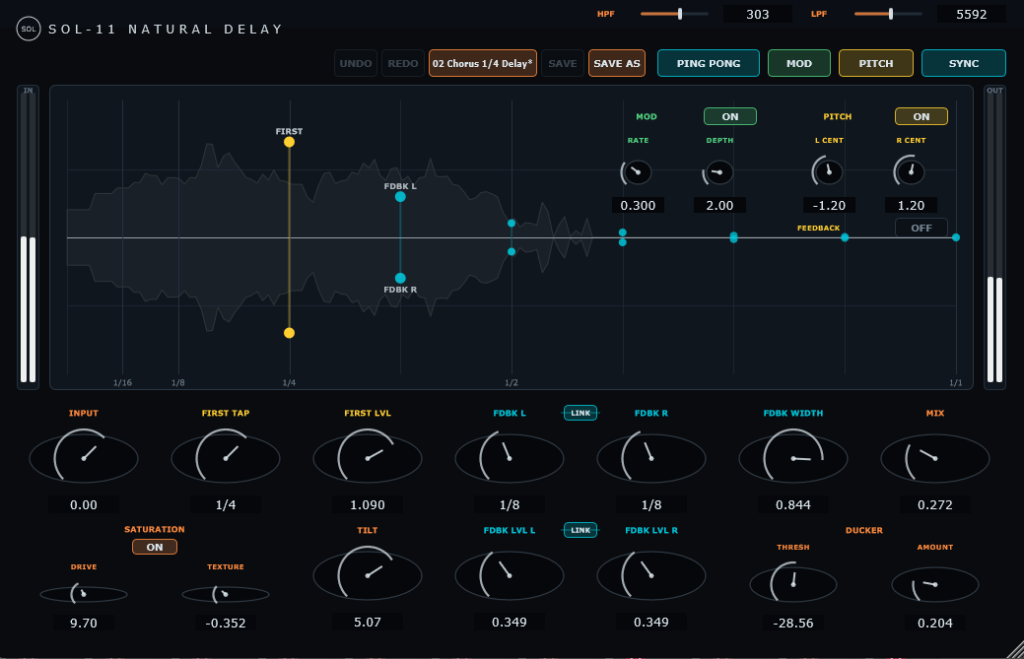
The main display turns delay timing, level, and stereo structure into one visual field. Yellow shows the first echo. Cyan shows the left and right feedback paths. Drag horizontally to change time, or vertically to set level.
The controls stay direct, but the architecture underneath remains genuinely stereo. Build a centered echo, independent L/R repeats, a narrower feedback image, or a full ping-pong pattern without losing sight of what the delay is doing.
What makes SOL-11 different
i.
The first echo has its own voice
FIRST TAP and FIRST LVL shape the immediate echo independently of the repeat path. Bring the first reflection forward for definition, then let quieter feedback create depth behind it.
ii.
True L/R feedback control
Left and right feedback timing and level can be adjusted separately. Link either pair when you want symmetrical editing, or unlink them for movement and rhythmic contrast.
iii.
Direct controls, visible relationships
The essential parts of a stereo delay remain on one surface. The display and knobs stay linked, so every move is both audible and visible.
iv.
Sync and ms without the jump
Switch between musical divisions and milliseconds while preserving the actual delay time as closely as possible. Move between rhythmic and free timing without losing the sound you already found.
v.
Width and Ping Pong
FDBK WIDTH narrows or expands the repeat image around the center. PING PONG alternates the feedback path across left and right for clear stereo motion.
vi.
Tone, filtering, saturation, and ducking
TILT quickly makes the delay darker or brighter, while dedicated HPF and LPF controls trim the feedback path itself, so repeats thin out naturally instead of building up low-end mud or harsh top end over time. DRIVE and TEXTURE add wet-path character without building distortion endlessly inside the feedback loop. DUCKER keeps repeats behind the incoming signal.
vii.
Pitch and modulation
Independent L/R pitch offsets create doubling, chorus, and interval shifts. PITCH FEEDBACK can accumulate the shift for shimmer-style repeats, while MOD adds stereo delay-time movement with Rate and Depth.
Typical uses
Key features
Factory presets
Natural 1/8 · Clear 1/4 Delay · Chorus 1/4 Delay · Vocal First Echo · Vocal Velvet Echo · Rhodes Doubler · Rhodes Short Delay · Guitar Slap · Chorus Short Delay · MOD 1/4 Delay · Pitch Shift 1/4 Delay · Rhodes Chorus · Shimmer Delay
Start with a straightforward delay, chorus, doubler, pitch shift, or shimmer preset, then adjust every parameter to fit the track. Your own settings can be saved as User presets.
Formats
Get SOL-11
Bring SOL-11 into your own sessions. Shape the first echo on its own, build the stereo repeat path, and find the point where the delay adds depth without getting in the way.
$39.9
One license · Free updates · No subscription · 14-day free trial available
SOL Studio Audio