SOL Studio Audio · Precision Equalizer
SOL-14 EQ
Build the curve once. Choose how it arrives.
A 16-band precision equalizer with dynamic processing, per-band Mid/Side routing, four phase behaviors and measured response accuracy – built for fast decisions without forcing every source into the same phase philosophy.
One license · Free updates · No subscription · Version 1.1.10
One EQ move, several valid answers
Precision is not only a curve. It is the freedom to compare.
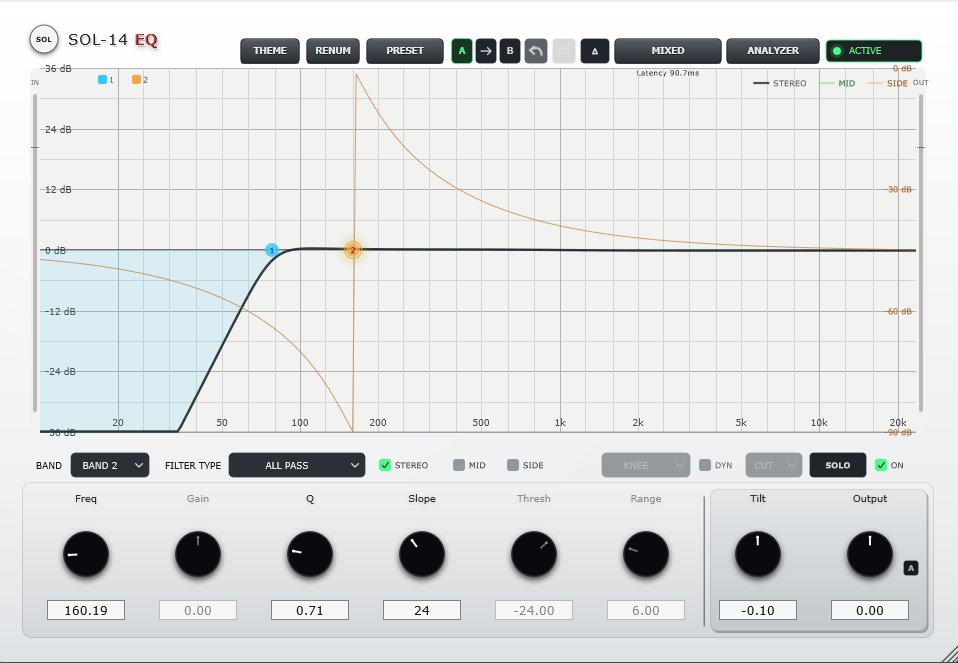
Shape the sound in zero-latency MINIMUM phase, then audition MIXED or LINEAR behavior without rebuilding the EQ. SOL-14 keeps the musical intention in place while letting you choose the phase response that best serves the source.
Four phase behaviors
MINIMUM, MIXED, LINEAR and LINEAR HIGH cover tracking, mixing and high-resolution mastering decisions from one shared curve.
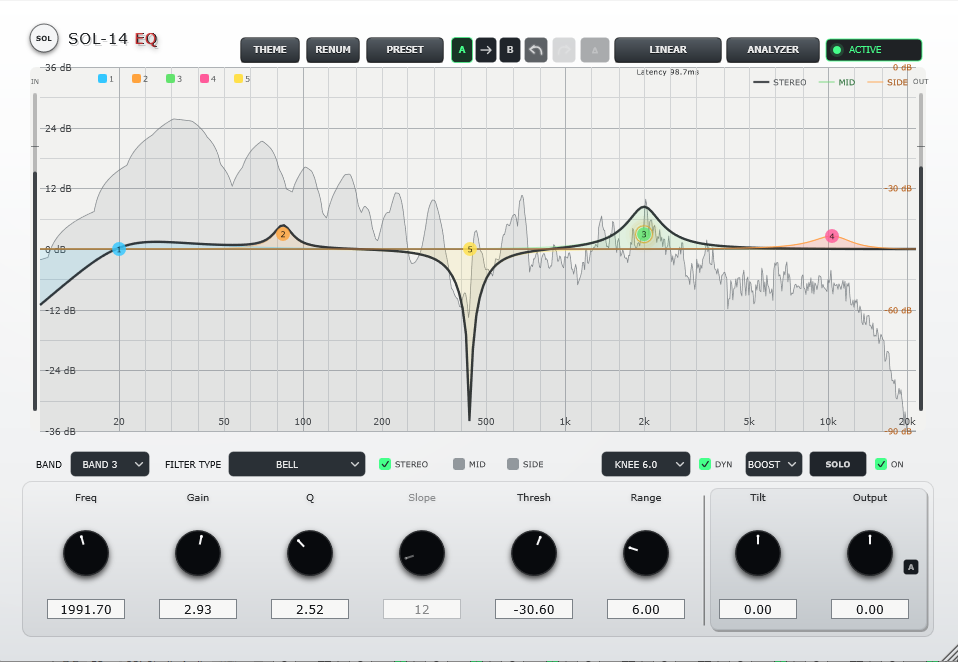
16 independent bands
Create nodes directly on the graph. Every band stores its own frequency, gain, Q or slope, filter type, channel routing and dynamic settings.
Stereo, Mid or Side per band
Target the full image, the center or the difference signal independently. Color-coded curves keep complex M/S work readable.
Stable dynamic behavior
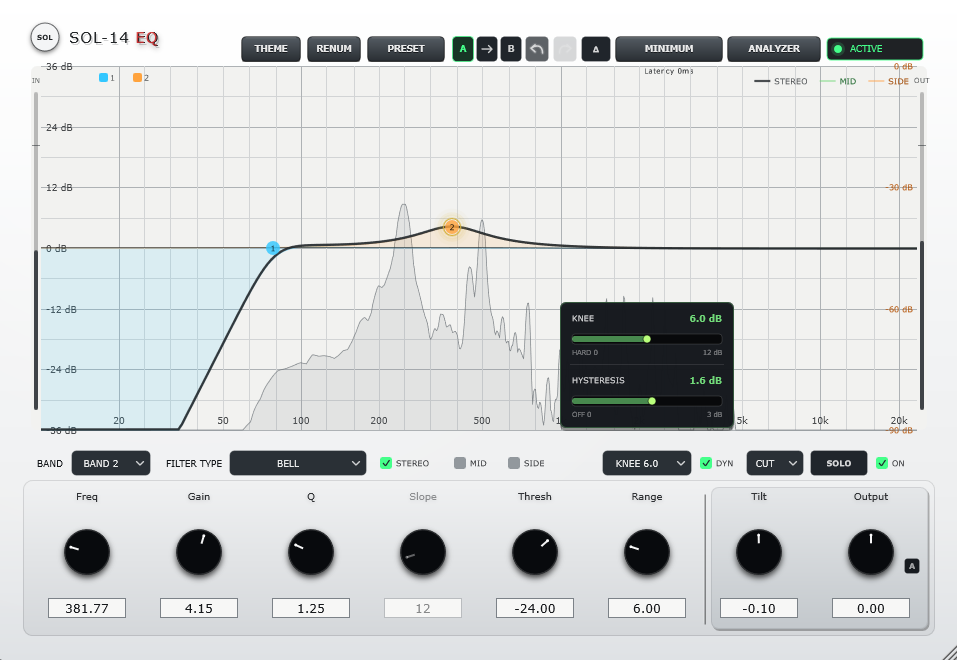
Add CUT or BOOST movement with Threshold, Range and Knee. Adjustable Hysteresis prevents marginal material from repeatedly entering and leaving dynamic action.
Hear the decision clearly
Right-click and hold a node for momentary SOLO, use persistent SOLO when needed, and switch to DELTA to hear only what the EQ changes.
Level-aware comparison
Choose true or level-matched bypass, use Auto Gain, compare A/B states and undo a complete preset load as one coherent action.
Choose your engine
Start with the response. Finish with the phase.
No single mode is universally better. SOL-14 makes phase choice part of the listening workflow instead of a decision you must make before the EQ move exists.
MINIMUM
Responsive IIR processing for tracking, live input, fast shaping and dynamic EQ. Use it when immediacy and attack matter.
MIXED
A mixed-phase FIR response that balances minimum-phase character with phase linearity when either extreme feels too assertive.
LINEAR
Linear-phase FIR processing for mix and mastering decisions where phase relationships matter more than monitoring latency.
LINEAR HIGH
A longer FIR engine for the highest available low-frequency accuracy when additional latency is an acceptable trade-off.
Measured, not implied
High precision with a stated engineering baseline.
SOL-14 is checked against independently calculated targets, production-path impulse responses, varied block sequences, float/double parity and measured FIR symmetry. The figures support accuracy – they are not a claim that one topology must sound better than another.
Reference scope includes response sweeps from 44.1 to 192 kHz, gains to +/-36 dB and Q values from 0.025 to 50 where applicable. Finite FIR length still creates a deliberate resolution-versus-latency trade-off at extreme settings.
Dynamic EQ
Static precision, with movement available per band.
The static gain remains the band’s base position. Enable DYN only where the material changes over time, then control how far and how smoothly the response moves.
Dynamic action starts at Threshold and remains active until the detector falls below Threshold minus the selected Hysteresis value. The gain response itself stays continuously calculated, so stability is improved without stepping or quantizing the movement.
- CUT and BOOST behavior with up to 24 dB Range
- Adjustable Knee from 0 to 12 dB
- 0 to 3 dB Hysteresis for stable threshold behavior
- Internal or external sidechain detector per band
- Dynamic EQ in MINIMUM, MIXED and LINEAR modes
- Latency-aligned hybrid dynamic layer in FIR modes
Filter system
From broad tone to surgical structure.
Nine filter types cover conventional tone shaping, steep band limiting and phase-only work without filling the interface with novelty modes.
A graph designed for action
Find it, shape it, compare it.
The interface keeps detailed control close to the selected band while preserving a clear view of the complete response.
Double-click the graph
Create a band where you hear the issue. Drag for frequency and gain; use the mouse wheel for Q.
Right-click to SOLO
Hold the right mouse button on a node to audition its Q-dependent region while you move or resize it.
Add DYN if necessary
Keep static problems static. Add dynamic movement only when the source actually changes over time.
Compare phase modes
Build in MINIMUM, then audition MIXED and LINEAR at matched level in the context of the full mix.
Analysis and monitoring
Visual detail when you need it. Silence when you do not.
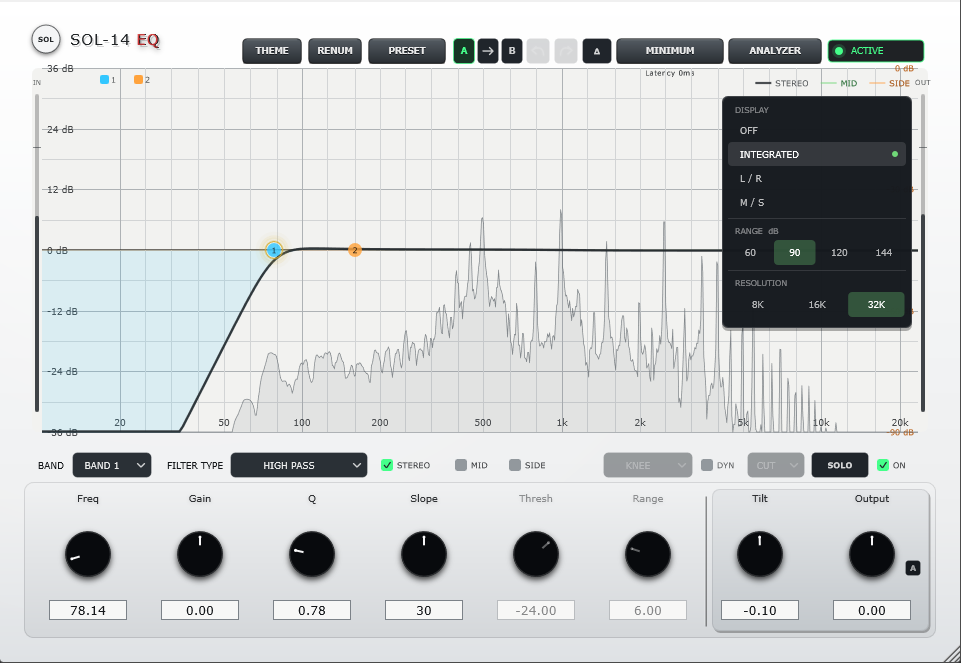
- Integrated, Left, Right, Mid and Side spectrum views
- Selectable 60, 90, 120 or 144 dB display range
- 8K, 16K High and 32K Very High FFT resolution
- Analyzer OFF mode leaves the audio path unaffected
- Slim input and output meters at the graph edges
- White Enamel, Graphite Ivory and Dark Theme
Processing and compatibility
Built for current Windows and Mac sessions.
SOL-14 EQ · Autumn Sale
Make the move. Then choose the phase.
Try SOL-14 on your own tracks, buses and masters. The free trial is fully functional and inserts only brief periodic silence for evaluation.