🔥 BRAND NEW!
🚀 The Ultimate Standalone Loudness Workflow.
Mastering loudness for streaming just got incredibly intuitive. SOL-1 Pro allows you to complete your entire workflow—from the final mastering check to bulk export—directly within the app, without ever needing to open a DAW or external player.
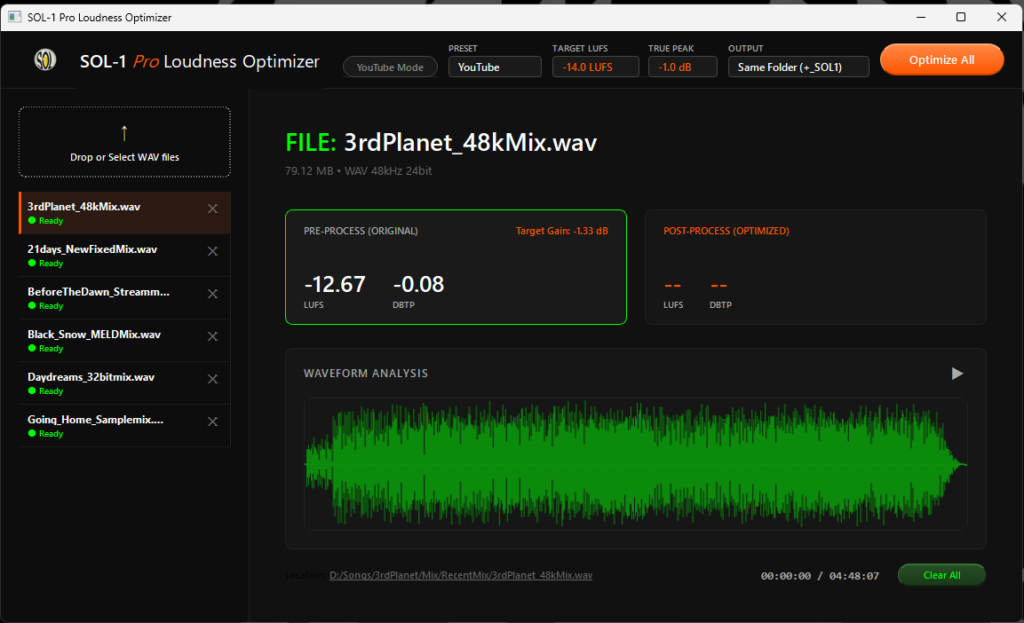
Overview
SOL-1 Pro is the definitive loudness mastering tool designed for music producers, audio engineers, and content creators who value speed and precision.
With our strict “Static Gain” Engine, we have safely optimized loudness for streaming platforms while keeping your original mix balance perfectly intact. It preserves your audio’s dynamics without the unnatural volume fluctuations (“pumping”) often caused by traditional broadcast algorithms.
Simply drag and drop your WAV files. SOL-1 Pro analyzes the current LUFS and True Peak before processing, allowing you to review the results, seamlessly A/B test the audio, and batch-process everything in seconds. No guesswork, no unnecessary steps.
🔥 Exclusive Pro Features
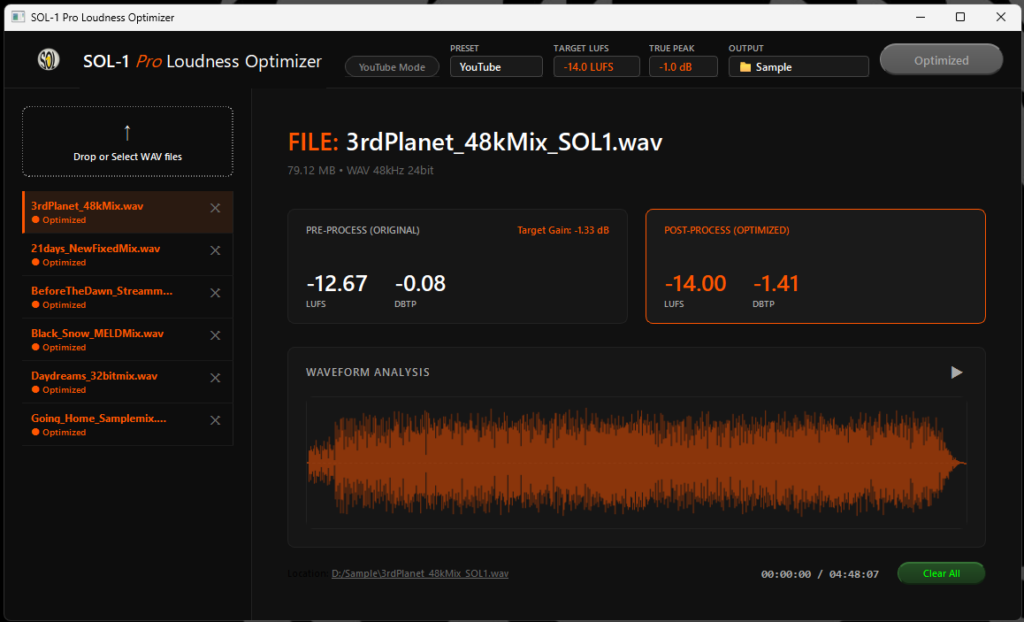
- Real-Time A/B Comparison (Position Synced): Switch between the PRE-PROCESS (original) and POST-PROCESS (optimized) tabs while the audio is playing. The track continues perfectly from the exact same position, allowing for professional, real-time A/B testing without interrupting your workflow.
- Batch Processing: Drag and drop multiple WAV files and process them all sequentially with a single click (“Optimize All”).
- Waveform Analysis & Seek Playback: Beautiful visual waveform display. Click anywhere on the wave to instantly seek and preview specific sections (like a chorus or drop) in high quality.
- “Static Gain” Engine: Eliminates “pumping” artifacts. It strictly prioritizes the True Peak limit (-1.0 dBTP) to guarantee 100% safe, musical normalization while preserving your track’s original macro-dynamics.
- Custom Output Destinations: Choose to save your optimized files in the original folder, or select a custom output directory.
⚡ Core Features
- Pre & Post Processing Analysis: Review input/output LUFS and True Peak for instant verification before and after changes are made.
- YouTube Mode (No Boost): When enabled, files already quieter than the target LUFS are skipped automatically, preserving dynamic range without unwanted boosting. (Following the same normalization standards as YouTube.)
- One-click Presets: Instantly set targets for YouTube (-14 LUFS), Spotify (-14 LUFS), and Apple Music (-16 LUFS).
- Adjustable Targets: Target LUFS from -25 to -5 LUFS, and True Peak options from -2.0 to -0.5 dBTP.
- Preserves Original Quality: Original bit depth and sample rate are strictly preserved.
- FFmpeg Built-in: No additional installation required.
Specifications
| Feature | Details |
| Supported Format | WAV files only |
| Output Destination | Same folder as source OR Custom selected folder |
| Output Filename | Automatically appended with “_SOL1” |
| Bit Depth | Inherited from source (16-bit / 24-bit / 32-bit float → 24-bit) |
| Sample Rate | Unchanged from source |
| Processing | “Static Gain” loudnorm, ITU-R BS.1770-4 compliant |
| Results Display | Input & Output LUFS / True Peak shown after processing |
System Requirements
- OS: Windows 10 / 11 (64-bit)
- Display: 1600 × 900 or higher recommended
- Additional Installation: None required (FFmpeg is included in the package)
Stop guessing and start mastering your loudness with confidence.
© 2026 SOL Studio Audio. All rights reserved.